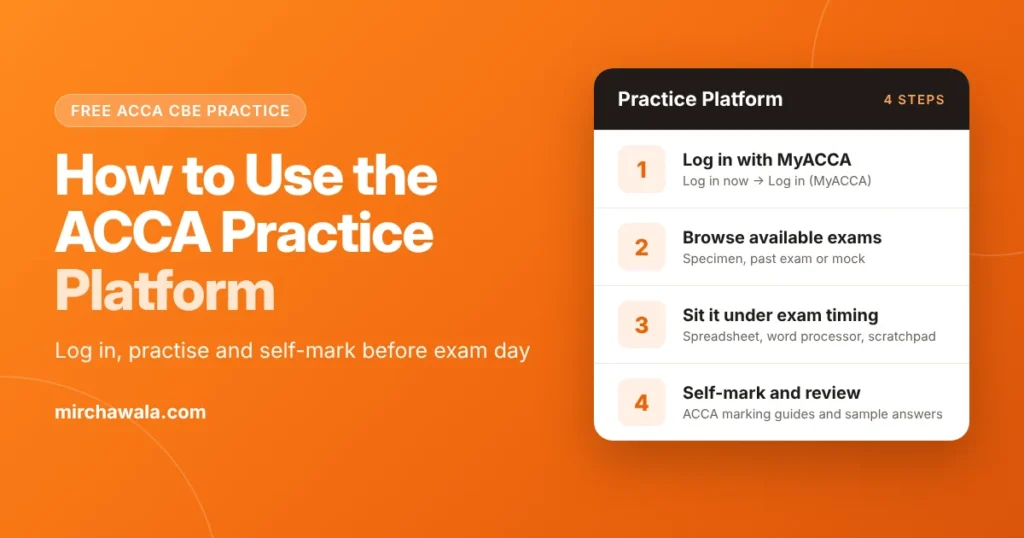
The ACCA Practice Platform is ACCA’s free, on-demand tool for practising computer-based exams (CBEs). Log in with your MyACCA details, choose a specimen exam, past exam or pre-exam mock, sit it on screen, then self-mark it with ACCA’s marking guides and sample answers. It uses the same format, layout and functionality as the live exam.
Key Takeaways
- There is no separate sign-up. You log in with your MyACCA details and accept the terms the first time.
- Specimen exams teach you the format, past exams give you timed practice with real questions, and pre-exam mocks let you rehearse before your session.
- Learn the word processor, spreadsheet, presentation and scratchpad tools before exam day, when time matters most.
- The platform covers Applied Skills and Strategic Professional exams. For BT, MA, FA and LW, use ACCA’s specimen exams and paid Practice Tests.
What Is the ACCA Practice Platform?
The ACCA Practice Platform is ACCA’s own practice environment for computer-based exams. ACCA describes it as “a free on-demand resource where you can practice using the live exam format, layout and functionality.”
On the platform you can view the specimen exam, try exam-standard questions, sit full past exams and then review your answers. You self-mark each attempt using ACCA’s marking guides and sample answers, and the platform tracks your performance across attempts.
It also gives you the same workspace you will see in the exam hall: spreadsheet and word processing response areas, presentation slides for Strategic Business Leader, a scratchpad and a PDF exhibit viewer.
[VERIFY] If you want to mention an on-screen calculator, confirm it on the platform first. ACCA’s Practice Platform pages do not list one.
ACCA moved the platform to a new web address on 18 June 2025. If you saved a bookmark before then, it will no longer work, so use the link on ACCA’s support page instead.
How Do You Log In to the ACCA Practice Platform?
You need to be a registered ACCA student. Then:
- Open ACCA’s Practice Platform and CBE support page and select Log in now.
- Choose Log in (MyACCA) and sign in with your MyACCA details.
- The first time, accept the platform’s terms and conditions.
- If you study with a tuition provider that uses the platform, pick the correct provider section. If you cannot see it, log out and back in.
- Select Browse Available Exams, choose your paper from Exam Category, and pick the exam type: specimen, past exam or mock.
Use the latest two versions of Chrome, Edge or Safari and an internet connection of at least 500 kbps. ACCA may change these steps, so check its support page for the latest version. If you need help signing in to MyACCA itself, see our step-by-step MyACCA login guide.
What Can You Practise on the Platform?
| What you can practise | What it gives you |
|---|---|
| Specimen exams | A sample paper that shows the CBE format and question styles |
| Past exams | Real questions from earlier sessions to sit under time limits |
| Exam-standard questions | Single questions to practise a topic after you study it |
| Pre-exam mocks | A full mock to sit before your exam session |
| Workspace tools | Spreadsheet, word processor, presentation slides, scratchpad and PDF exhibits |
| Self-marking | ACCA’s marking guides and sample answers to check your work |
Which Exams Are Covered?
ACCA’s Practice Platform pages list content for Applied Skills session exams and the Strategic Professional exams (SBR, SBL, AFM, APM, ATX and AAA).
For the on-demand exams (BT, MA, FA and LW), use ACCA’s free CBE specimen exams. ACCA also sells Practice Tests for these exams through ACCA Learning, using your MyACCA login: a set of three tests per exam, at £14 for BT, MA and FA and £18 for LW. ACCA recommends using them once you have studied the full syllabus.
How Do You Get an ACCA Pre-Exam Mock?
ACCA publishes a short guide, Student PP access to Pre-Exam Mocks (PDF). In short:
- Log in to the Practice Platform with MyACCA.
- Select Browse Available Exams and choose your paper from Exam Category.
- Choose your variant (if there is one) and set the exam type to Mock.
- Find the mock named for your session, for example “PreSeptember 2025 Mock”.
- Select Assign. The mock then appears under Assignments, ready for you to sit.
How Is the Practice Platform Different From the Real Exam?
ACCA says there are a few minor differences between the Practice Platform and the live exam software, and its differences guide (PDF) lists them:
- Selecting text in PDF exhibits: on the platform you can select text straight away. In the live exam, you first switch from the Move Tool to the Text Tool.
- How selected text looks: the platform shades selected text; the live exam greys it out.
- Find Tool: on the platform it sits at the top of the PDF toolbar; in the live exam it is on the left-hand side.
- Pasting into spreadsheet answers: in the live exam, double-click the cell or select the formula bar, then press Ctrl+V.
Practise the live-exam way so these steps feel automatic on the day.
How to Use the Practice Platform Effectively
Regular, timed practice is what turns knowledge into marks. It shows you the exam structure, builds speed, and tells you honestly which topics are weak.
1. Start With a Baseline Test
Before revising, sit a specimen exam or a past exam on topics you have already studied. Mark it and note which areas lost you marks. Keep working on your strong topics too, so they stay strong.
2. Practise by Topic, Then Full Exams
After each chapter, try exam-standard questions on that topic. Begin with the easier questions before moving to harder ones. Save full past exams for later in your revision, once you have covered the syllabus.
3. Simulate Real Exam Conditions
Sit full exams in one go, with the same time limit as the real exam and no notes. This builds writing speed and time management, and makes you comfortable with the spreadsheet, word processor and scratchpad.
4. Self-Mark Honestly and Review
Use ACCA’s marking guides and sample answers to mark every attempt. Compare your answer with the sample answer line by line, then adjust your revision plan around the gaps.
5. Read the Examiner’s Reports
ACCA publishes examiner’s reports on each exam’s study resources page (for example, the AAA resources page). They explain common mistakes and what markers look for. Read the report for the past exam you have just sat.
6. Plan and Stay Consistent
Book practice into your weekly study plan, for example one timed question a day and one full exam a week near the exam session. Small, regular sessions beat last-minute cramming. Check the ACCA exam dates so your mock lands a few weeks before your exam.
If you study with a tuition provider, ask whether they use the Practice Platform. ACCA lets approved learning partners assign their own tests to students and mark answers with feedback, much like ACCA marks live exams.
Sitting ACCA Exams in India
ACCA says students in India take both on-demand and session exams at exam centres, and remote exams are not offered where centres are available. So the computer screen you practise on is the one you will meet in the exam centre. See our guide to ACCA exams in India for centres and booking, and ACCA in India for the wider qualification.
Common Practice Platform Problems
- Old link not working: the platform moved in June 2025. Use the Log in now button on ACCA’s support page.
- Mock or exam not showing: check you are in the right provider section, and that you set the exam type correctly in Browse Available Exams.
- Screen not loading properly: switch to a recent version of Chrome, Edge or Safari and check your internet speed.
- Still stuck: raise a case through the Help section of your MyACCA account.
Frequently Asked Questions
How do I use the ACCA Practice Platform?
Log in with your MyACCA details, choose a specimen exam, past exam or mock, and sit it on screen under timed conditions. When you finish, self-mark it with ACCA’s marking guide and sample answers, then review where you lost marks.
How do I find the ACCA Practice Platform login?
Open ACCA’s Practice Platform and CBE support page, select Log in now, and choose Log in (MyACCA). The platform moved to a new address in June 2025, so older bookmarks no longer work.
What is the ACCA CBE Practice Platform?
It is ACCA’s free, on-demand tool for practising computer-based exams (CBEs). It uses the live exam format, layout and functionality, so the screen feels familiar on exam day.
How do I get an ACCA pre-exam mock?
Log in to the Practice Platform ACCA, select Browse Available Exams, choose your paper and set the exam type to Mock. Select Assign, and the mock appears under Assignments. ACCA’s guide “Student PP access to Pre-Exam Mocks” shows each step.
Are ACCA mock exams free on the Practice Platform?
Yes. The Practice Platform, including its specimen exams, past exams and pre-exam mocks, is free for registered ACCA students. The separate Practice Tests for BT, MA, FA and LW are paid (£14 or £18 for a set of three).
Is the ACCA Practice Platform the same as the real exam?
Almost. ACCA lists a few minor differences, such as how you select text in PDF exhibits and how you paste into spreadsheet cells. Read ACCA’s differences guide before exam day.